
Wedding Player
for Venues & Coordinators
Every couple's ceremony, ready on the day
One venue device, every wedding in its own workspace. Checked weeks ahead, run in a locked Live Mode by whichever coordinator is on, and fully offline wherever the ceremony takes place.

 Free to Try
 From £5.99 a month or £49.99 a year, with a free month to start.
The ceremony music app, set up before the day
Wedding Player plays the music for a wedding ceremony, from guests arriving to the walk back down the aisle, on iPhone, iPad and Android. Couples use it for their own wedding. Venues use it to run every ceremony they host.
Add the music
Wedding Player Originals, instrumental ceremony tracks included free, plus Apple Music (iOS) and the couple's own MP3, M4A or WAV files. Mix any of them.
Shape each moment
Each part of the ceremony gets its own moment and music. Trim where each track starts and ends, set fades of 2 to 15 seconds, and loop a moment until you're ready to move on.
Run it on the day
Live Mode hides the editing tools and runs the running order from one large button. Tracks play from the device once downloaded, with no WiFi needed.
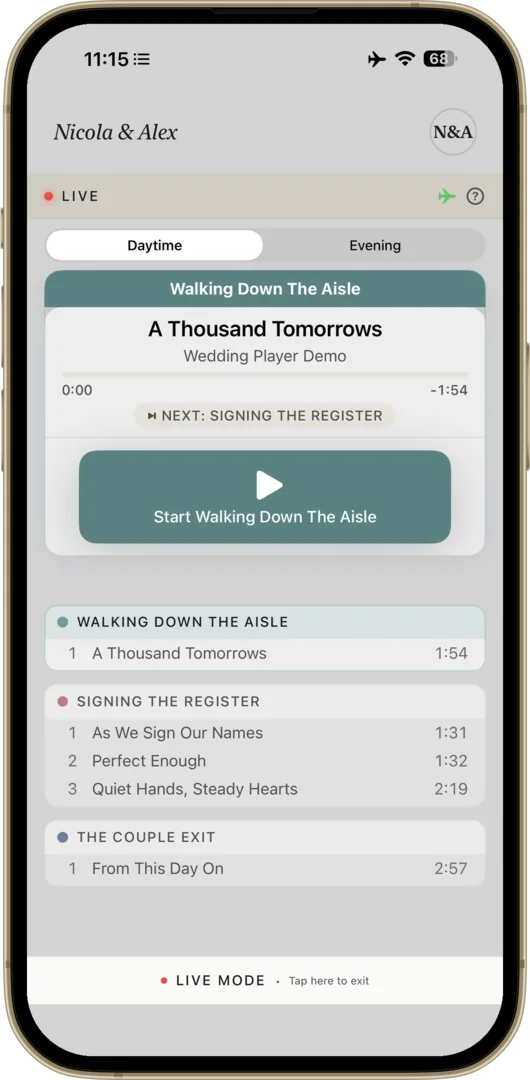
Back-to-back weddings, each in its own workspace
Every couple, kept separate
Each wedding has its own moments, music and timings, sorted into Today, This week and the rest of your bookings, with finished weddings swiped into the Archive. Switch in a tap, with nothing to wipe and nothing to rebuild between couples.
Right couple, right day
When you go live, Wedding Player shows the couple and date you're about to run and warns you if that wedding isn't dated today, so you can check you have the right couple before anything plays.
Any coordinator can run it
Live Mode hides the editing tools and locks wedding switching, leaving one large button to start each moment and fade to the next. Whoever is on shift can run it.
Problems caught weeks early
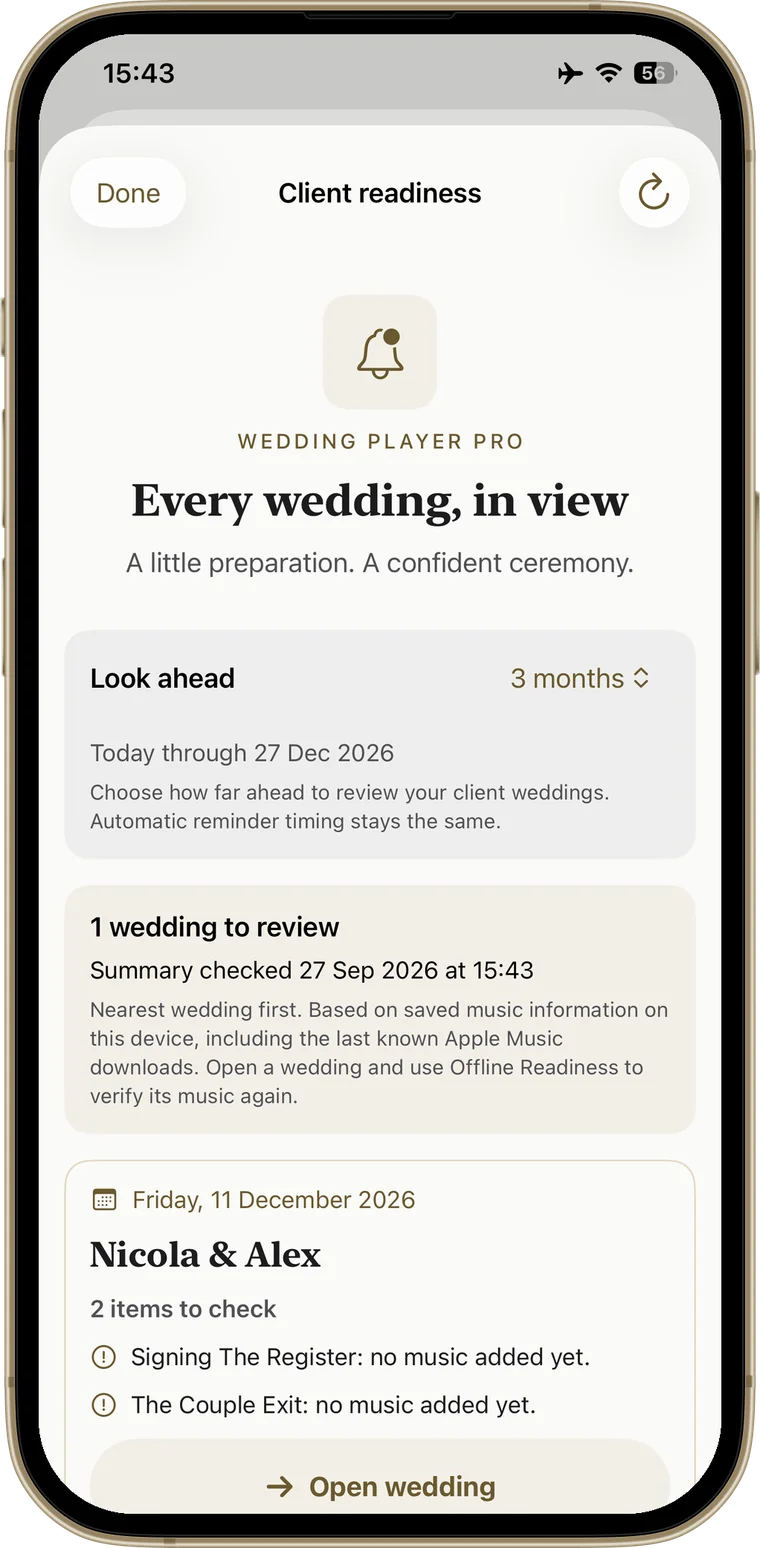
Readiness reminders list every upcoming wedding with a confirmed date that needs attention, soonest first: missing files, tracks that may still need downloading, empty moments. iPhone, iPad and Android.
Checked on the day
One screen to work through before you go live: your tracks, airplane mode, Do Not Disturb, the speaker and your volume. The Go Live button stays off until you've ticked each one, and it won't start while the phone is muted.
No WiFi needed
Once downloaded, tracks play from the device, with nothing streaming and nothing buffering, and the app checks they're on the device before the day. It works in airplane mode, wherever on the grounds the ceremony is. Apple Music tracks still need the subscription and a download.
Every couple's ceremony is set up the same way: trimmed tracks, fades of 2 to 15 seconds, moments that loop until you're ready to move on, and smooth transitions between tracks (on iPhone and iPad they crossfade, and Apple Music crossfades need iOS 18; on Android, one track fades out and then the next fades in). More venue features, including staff handoff, are in development.
Know which weddings aren't ready
One summary of every upcoming client wedding with a confirmed date that needs attention, soonest first: missing files, tracks that may still need downloading, empty moments. Each card shows the details and opens the wedding in a tap. Look ahead 3, 6, 12, 18 or 24 months, and reach your reminders straight from Manage Weddings.
Find out that a couple's processional was never downloaded weeks before the wedding, not on the morning.
Included in the Professional Licence: £5.99/month or £49.99/year, first month free. iPhone, iPad and Android. See how reminders work →
Ask an AI about it.
Get a quick, straight answer before you decide.
One Licence, Every Wedding You Host
Monthly
per month
Annual
per year
Cancel any time. Pro includes a 1-month free trial of every Pro feature.
Free to try What the licence covers:
- Unlimited wedding ceremonies
- Today, This week and Archive sections
- Live Mode for any coordinator on the day
- Readiness reminders
- Plays offline once tracks are downloaded
- No per-wedding fees
Auto-renewable subscription via the App Store (iOS) or Google Play (Android). When the free month ends it renews at the price of the plan you chose, unless you cancel first. Store prices may vary by region.
Free to try Venue Questions
How do we get each couple's song choices?
How does it connect to our PA?
We have more than one ceremony device. How many licences do we need?
Can we build on one device and run on another?
Can couples manage their own music instead?
Is there pricing for larger venues or groups?
Is it on Android?
How do we get each couple's song choices?
How does it connect to our PA?
We have more than one ceremony device. How many licences do we need?
Can we build on one device and run on another?
Can couples manage their own music instead?
Is there pricing for larger venues or groups?
Is it on Android?
Try It on Your Next Wedding
Start with a free month, set up your next couple's ceremony, and run it in Live Mode on the day. Nothing renews until the month is up, and you can cancel any time.
Start with a free month →Questions? Get in touch