
Wedding Player
for Celebrants & Officiants
You lead the ceremony. The music just works.
Run the music yourself, or point your couples to an app you trust. Every song trimmed, faded and cued in order, fully offline, in a locked Live Mode.

 Free to Try
 Running multiple weddings: £5.99 a month or £49.99 a year, first month free.
Recommending it: your couples pay £12.99 once, with no subscription.
The ceremony music app, set up before the day
Wedding Player plays the music for a wedding ceremony, from guests arriving to the walk back down the aisle, on iPhone, iPad and Android. Couples use it for their own wedding. Celebrants and officiants run it at the ceremonies they lead, or recommend it to their couples.
Add the music
Wedding Player Originals, instrumental ceremony tracks included free, plus Apple Music (iOS) and your own MP3, M4A or WAV files. Mix any of them.
Shape each moment
Each part of the ceremony gets its own moment and music. Trim where each track starts and ends, set fades of 2 to 15 seconds, and loop a moment until you're ready to move on.
Run it on the day
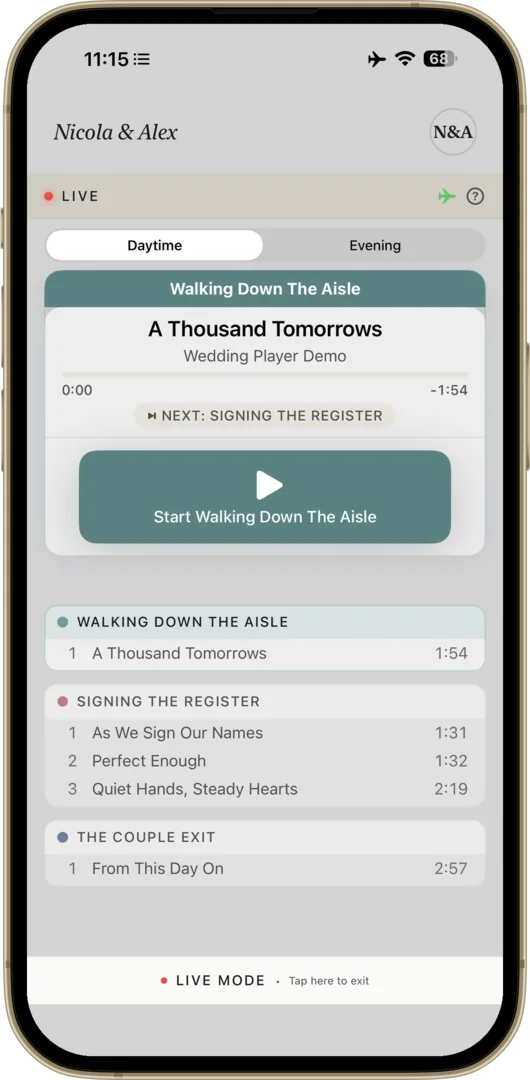
Live Mode hides the editing tools and runs the running order from one large button. Tracks play from the device once downloaded, with no WiFi needed.
Recommend it, or run it
Your couples run it ↓
When couples ask what to use, give them a confident answer and share it from the app in one tap. They pay £12.99 once, with no subscription.
You run the music ↓
Ceremonies with no DJ and no musicians. Build the running order with the couple, then press play between your words. Try it free for a month.
A confident answer when couples ask
Explore the free demo
Download it free and explore the built-in demo, to get to know how it works before you recommend it.
Or take the free month
Start the free month and try Live Mode properly. Cancel before it renews and it costs nothing.
Then share it from the app
Share Wedding Player with your couples straight from the app, whichever way suits them. Couples who run their own music pay a one-off £12.99, with no subscription.
QR code to scan
Share sheet
Personalised email
No fumbling with your phone mid-ceremony
-
Guests arriving
Music on a loop
Set the arrival music to loop, so it keeps playing until you're ready to begin.
-
The entrance
One tap to start
Live Mode shows one large button for the moment that's next. The processional starts exactly where you trimmed it.
-
They reach you
Fade it out
Fade the music over 2 to 15 seconds, your choice. Confirm each fade first, or switch to one-tap fades in Settings.
-
Signing and the exit
Already lined up
The next moment is ready and waiting, so the signing music and the walk back down the aisle are a tap each.
Before you go live
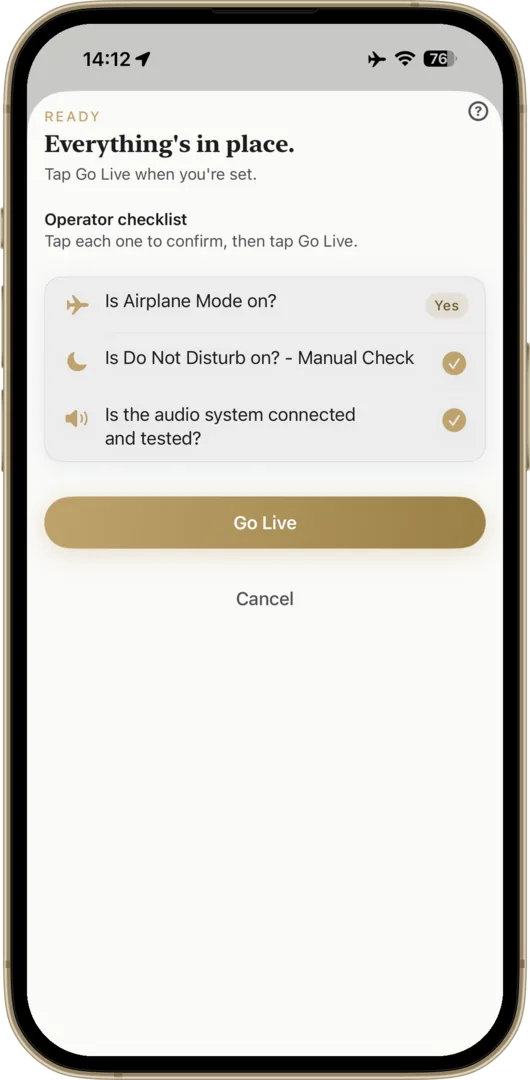
One screen to work through before you go live: your tracks, airplane mode, Do Not Disturb, the speaker and your volume. The Go Live button stays off until you've ticked each one, and it won't start while the phone is muted. Tracks play from the phone once downloaded, so a beach or a barn with no signal is fine.
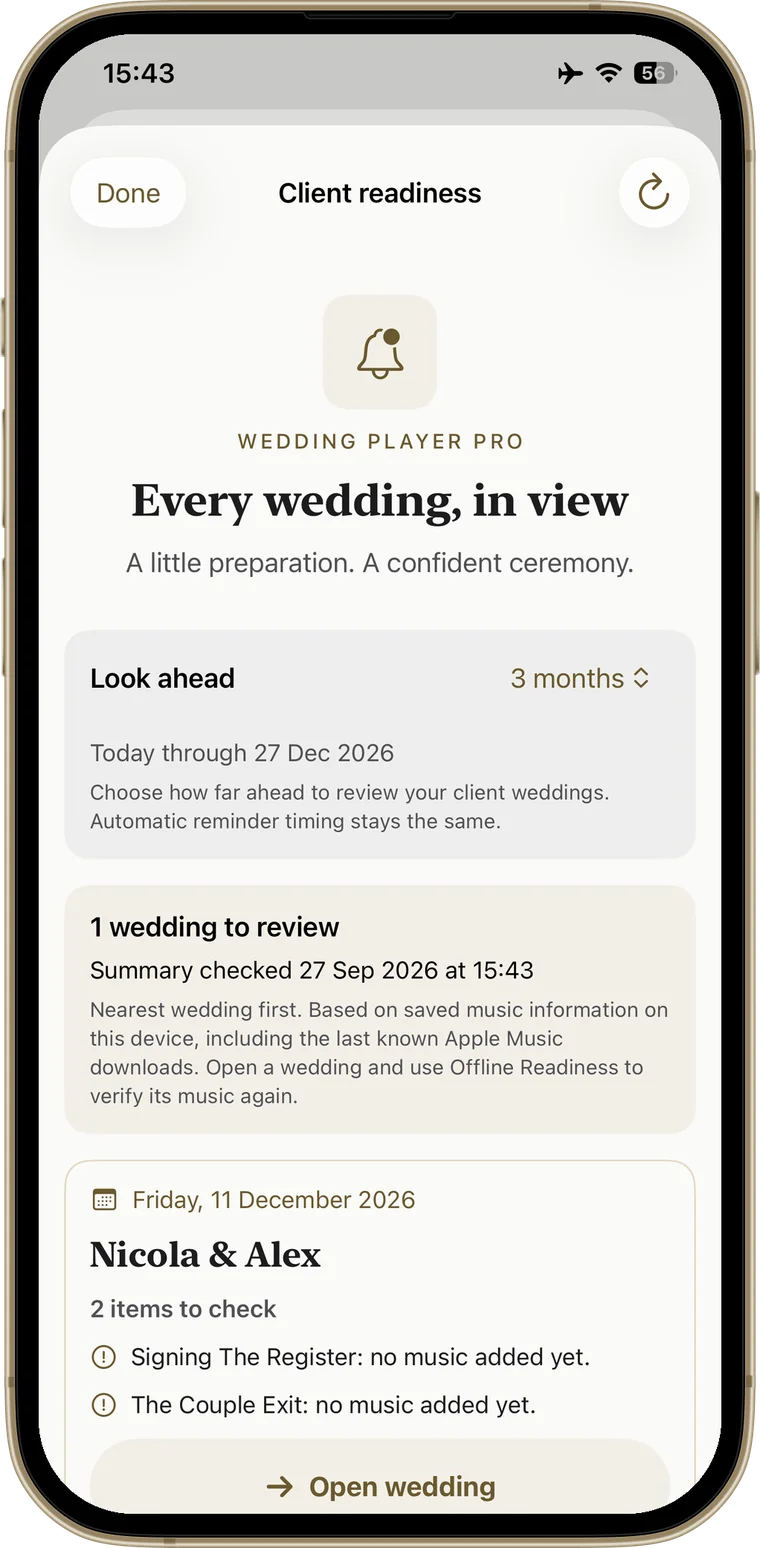
Know which weddings aren't ready.
One summary of every upcoming client wedding with a confirmed date that needs attention, soonest first: missing files, tracks that may still need downloading, empty moments. Each card shows the details and opens the wedding in a tap. Look ahead 3, 6, 12, 18 or 24 months, and reach your reminders straight from Manage Weddings.
Find out that a couple's processional was never downloaded weeks before the wedding, not at the venue.
Included in the Professional Licence: £5.99/month or £49.99/year, first month free. iPhone, iPad and Android. See how reminders work →
“Whoever created this app clearly understands what people actually need when managing music for an event.”
A wedding officiant
Five-star App Store review
“The music starts when it’s supposed to, fades when needed.”
Sarah Mary Coughlan
Marriage Solemniser
“I was at a meeting with one of my couples in Preston and they opened your app to chat through their music! They said it was a game changer for them.”
Una Haslinger
Celebrant
Ask an AI about it.
Get a quick, straight answer before you decide.
One Licence, Every Couple You Marry
Monthly
per month
Annual
per year
Cancel any time. Pro includes a 1-month free trial of every Pro feature.
Free to try - Unlimited wedding ceremonies
- One workspace per couple, switch in a tap
- Trims and fades on every track
- Locked Live Mode
- Plays offline once your tracks are downloaded
- No per-wedding fees
Auto-renewable subscription via the App Store (iOS) or Google Play (Android). When the free month ends it renews at the price of the plan you chose, unless you cancel first. Store prices may vary by region.
Celebrant & Officiant Questions
I lead the ceremony. Can I run the music at the same time?
I don't touch the music. Is this still for me?
Who presses play if it's not me?
How do I connect to the venue's speakers?
Where does the music come from?
Do I need the Professional Licence?
Can I use it for funerals too?
Is it on Android?
I lead the ceremony. Can I run the music at the same time?
I don't touch the music. Is this still for me?
Who presses play if it's not me?
How do I connect to the venue's speakers?
Where does the music come from?
Do I need the Professional Licence?
Can I use it for funerals too?
Is it on Android?
Make the Music the Easy Part
Download free, build a ceremony in the built-in demo, then take the free month and run it at a real wedding. Cancel before it renews and it costs nothing.
Start with a free month →Questions? Get in touch