Apple Music, direct from your Library
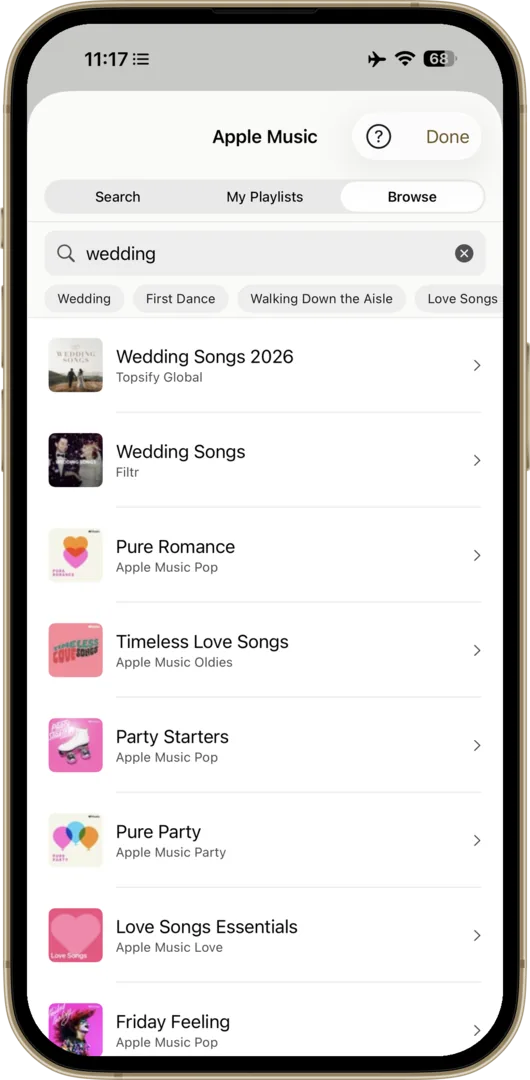
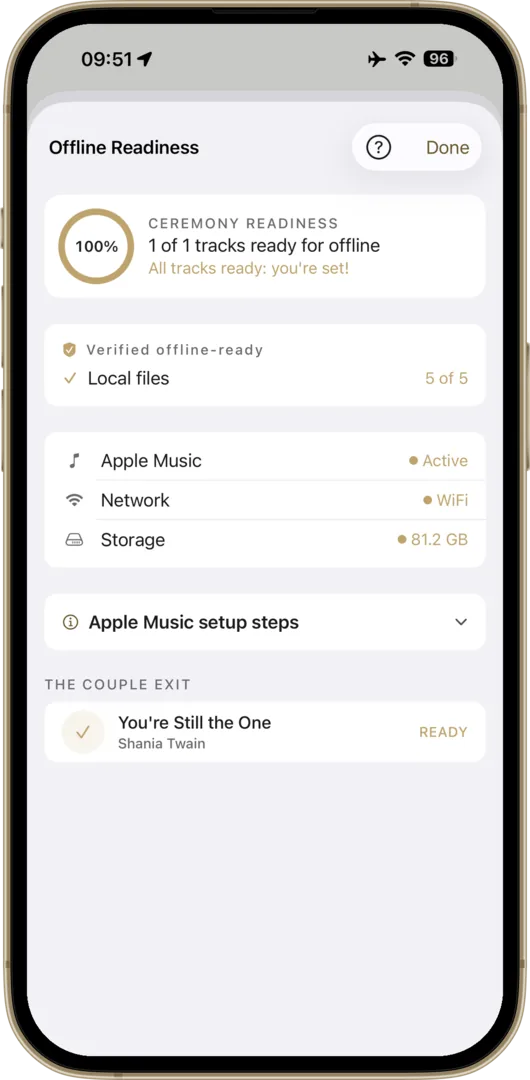
If you have an Apple Music subscription on iPhone or iPad, this is the easiest route by a wide margin. Wedding Player connects directly to Apple Music, so you can search the full catalogue, add tracks, and play them with crossfade and full offline support, no file management required.
Does Wedding Player work with Apple Music?
Yes, on iPhone and iPad. Wedding Player connects directly to your Apple Music subscription so you can search the full catalogue, add tracks, and play them with crossfade and full offline support once downloaded. Apple Music is optional: on Android you build your ceremony from your own files and Wedding Player Originals instead.
Can I mix Apple Music tracks with my own audio files in one playlist?
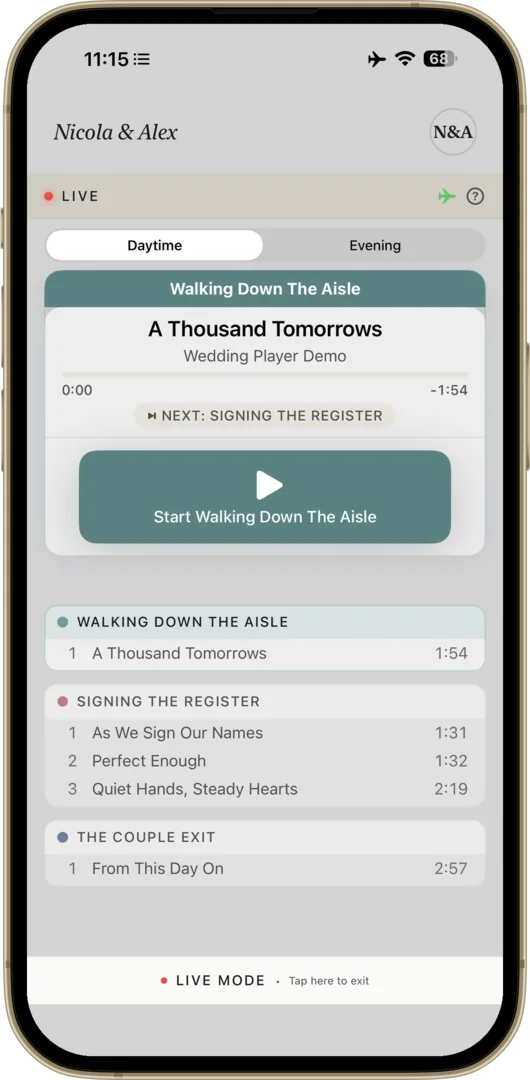
Yes. On iPhone and iPad, Wedding Player plays Apple Music tracks and your own local files (MP3, M4A, WAV) in the same moment, with crossfade across both, so a custom-edited file can sit alongside a streaming track in one running order.
Why can no wedding app play Spotify?
Spotify does not allow third-party apps to fade, mix, or play its catalogue offline. The most any app can do is remote-control the Spotify app online, with no fades and no protection if the signal drops. This is true of every wedding app, not just Wedding Player.
What can Spotify users do instead?
Buy your key tracks outright from a DRM-free store for full offline playback, or start a free Apple Music trial that covers the whole day and cancel afterwards. Wedding Player mixes either route with your own files in one playlist.
Inside the app
How to add an Apple Music track
- Open the moment you want the track in.
- Tap Add Tracks (or Edit Tracks if the moment already has music).
- Tap Add Apple Music.
- Search the catalogue or browse your Library, then pick the track.
- Drag to reorder if you have more than one track in the moment.
Apple Music integration is iPhone and iPad only. On Android, see Buy Individual Tracks or Wedding Player Originals.
No subscription?
The free-trial route
Apple Music offers a free trial. If you do not currently subscribe but you want specific mainstream songs for the day, you can sign up for the trial a few weeks before the wedding, build your moments in Wedding Player, and cancel after the day if you do not want to keep it.
Trial length and pricing vary by country, so check the Music app or App Store for the current offer in your region. Use Wedding Player for the rehearsal and the wedding itself, then cancel if you want to go back to your previous service.
If you use Spotify
Why can no wedding app play Spotify?
If you're a Spotify user, you've probably already searched the App Store for a wedding music app that works with your library. There isn't one. Not from us, not from anyone. That isn't a choice any app maker took: it's how Spotify licenses its catalogue, and the rules apply to every app equally.
The rules every app faces
- No fades, no blending. Spotify's developer rules prohibit apps from fading, mixing, or overlapping Spotify songs with any other audio. The smooth fades that carry your day from one moment to the next, the walk in, the signing, the first dance, are exactly what's not allowed.
- Remote control only, online only. The most any app may do is ask the Spotify app to play, pause, or skip. That connection needs the internet to start, a Premium account, and the Spotify app running in the background. Your Premium downloads are real, but they're locked inside the Spotify app: no other app can play them. A thick-walled venue with no signal ends it before it begins.
- Personal use only. Spotify's licence covers personal, non-commercial listening. Venues, celebrants, and planners running weddings professionally couldn't use it even if everything else worked.
Even Spotify's own partners stream only
In 2025 Spotify reopened access for three of the world's biggest DJ platforms. The result shows the ceiling: desktop only, Premium only, and every track streams live, so if the venue Wi-Fi drops, the whole library goes with it. That's the version of "Spotify integration" the largest companies in DJ software could negotiate. And in 2020, Spotify withdrew this same access from every DJ app with a few months' notice. A wedding day can't be redone, and its music shouldn't depend on a permission that can be switched off.
Why Apple Music works
Apple built a framework called MusicKit specifically for apps like Wedding Player. It gives the app full, direct control over music playback. That means:
- Real crossfade between songs, timed to the second.
- Instant fade-out when the moment calls for it.
- Offline playback with downloaded tracks, no internet needed.
- Live Mode with large, simple controls designed for the person running music at the venue.
What can Spotify users do instead?
The ceremony itself only needs a handful of songs, and Apple Music's full catalogue can carry the rest of the day. Three options:
- Buy your key tracks outright from iTunes Store, Bandcamp, Qobuz, or another DRM-free store. Full crossfade, full offline support, no subscription. See Buy Individual Tracks.
- Start a free Apple Music trial. It covers every moment from the walk in to the last dance. Use it for the rehearsal and the wedding, then cancel afterwards and go back to Spotify for everyday listening.
- Mix and match. Wedding Player handles local files and Apple Music in the same playlist, with crossfade across both. Some couples own a few tracks already and find the rest on Apple Music.
Your wedding music is too important to leave to "it should work." For most couples, a few tracks bought outright or a one-month Apple Music trial covers the whole day.
Weighing it up? See the full Wedding Player vs a Spotify or Apple Music playlist comparison.