
Wedding Player

Wedding Player

Your Wedding Music deserves more than just a playlist

Wedding Player is the app that plays all your wedding music, perfectly timed and fully offline.

Tap below to Play Demo
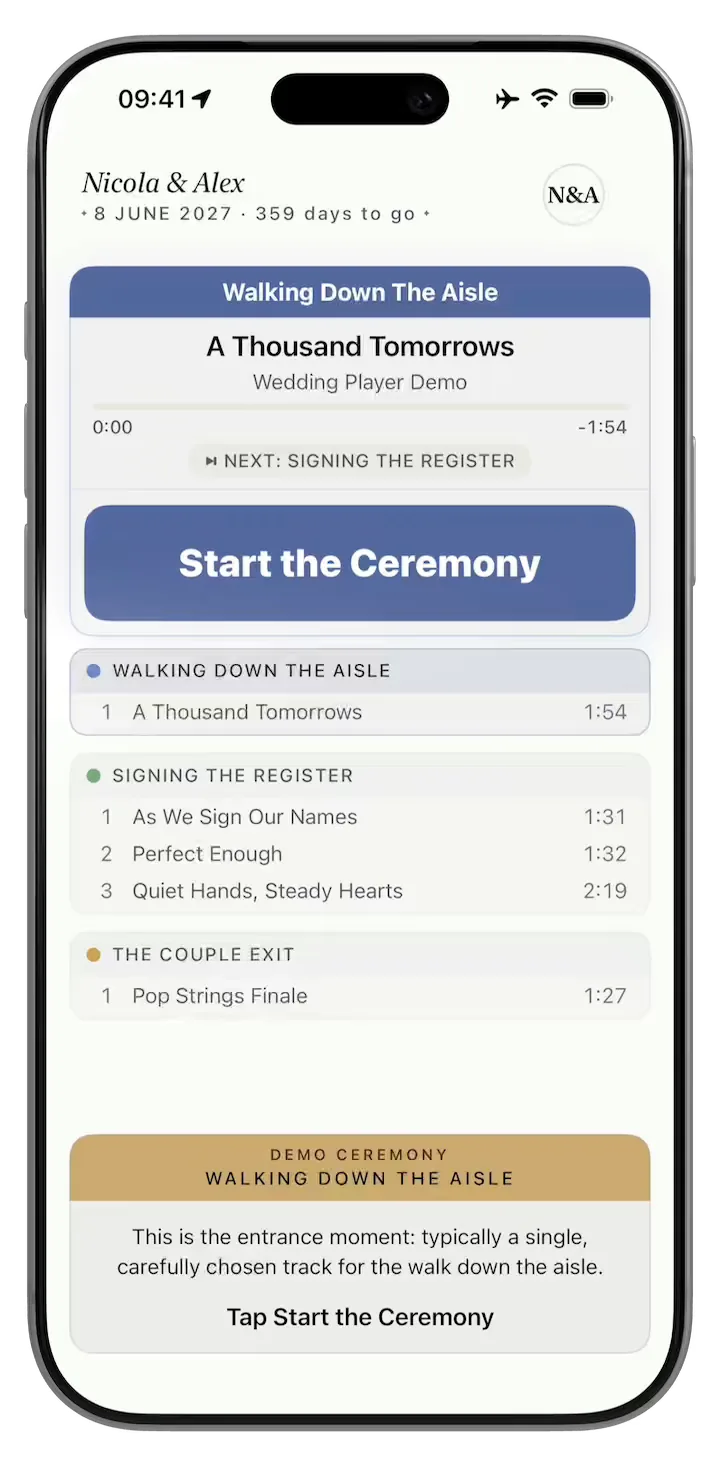
Wedding Player demo: a guided ceremony walkthrough

Pinch to zoom in

Download for free to plan your music.

Couples pay £7.99 once to unlock all features.

No subscription, ever.

Running multiple weddings?
Professional Licence
In the Press
"Ceremony music often gets left until surprisingly late in the planning process, even though it completely shapes the atmosphere of the moment. Wedding Player was built specifically to help couples organise their wedding ceremony soundtrack."

Zoe Burke, Head of Brand at Bridebook

"I love that the app works offline. That was incredibly smart, because you can never rely on Wi-Fi."

Dave Ginsburg, In Touch With iOS

"It's clean. It's easy to use."

Sharon Underwood, Wedding Mayhem

"It downloads it all to the phone, so you don't need Wi-Fi. Woodland wedding, church wedding, there's no Wi-Fi... There's a lot of tech there for £7.99."

Allison Hargreaves, CEO, Guides for Brides

As featured in

Every cue, exactly when you need it

Trim Every Track to the Second

Intro too long? Trim any song to start and end exactly where you want. Set your fades, preview it, done. No laptop, no other apps. What you hear is what plays on the day.
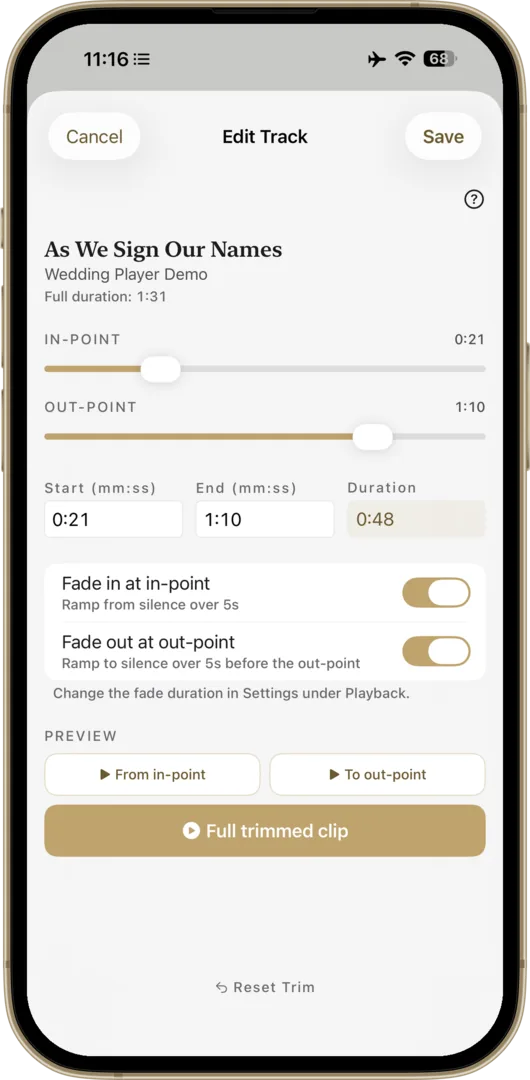
Trim and Fade editor

Zero Signal? No Problem.

Venue WiFi can't be trusted, so we don't use it. Every track lives on your phone, and the app checks they're all there before the day. No streaming, no buffering, works in airplane mode.
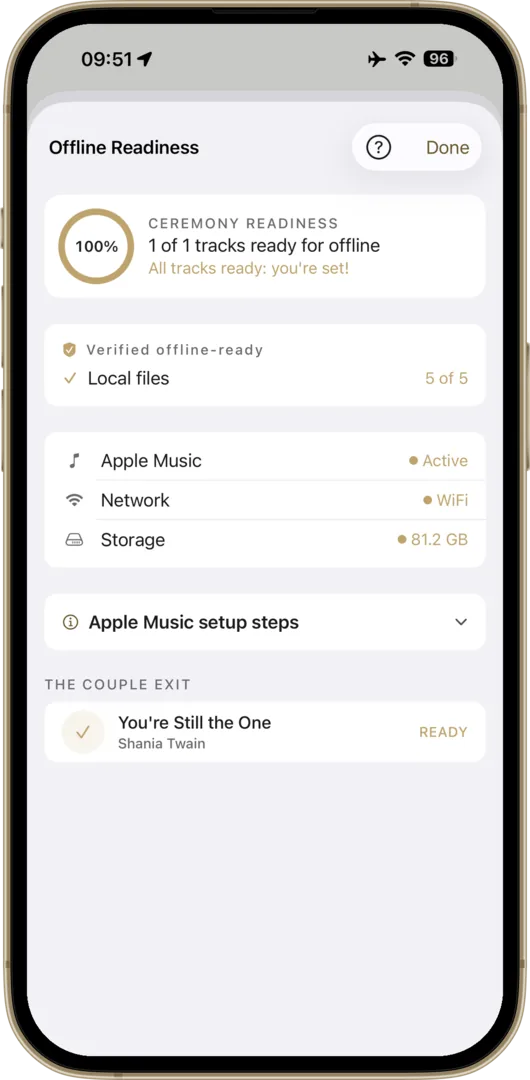
Offline Readiness check verifying all tracks are stored on device

Panic-Proof Go Live Check

One screen checks everything before you go live: tracks downloaded, airplane mode on, battery full, Do Not Disturb set. Until it's all ready, the Go Live button stays disabled, so you can't start before everything's set.
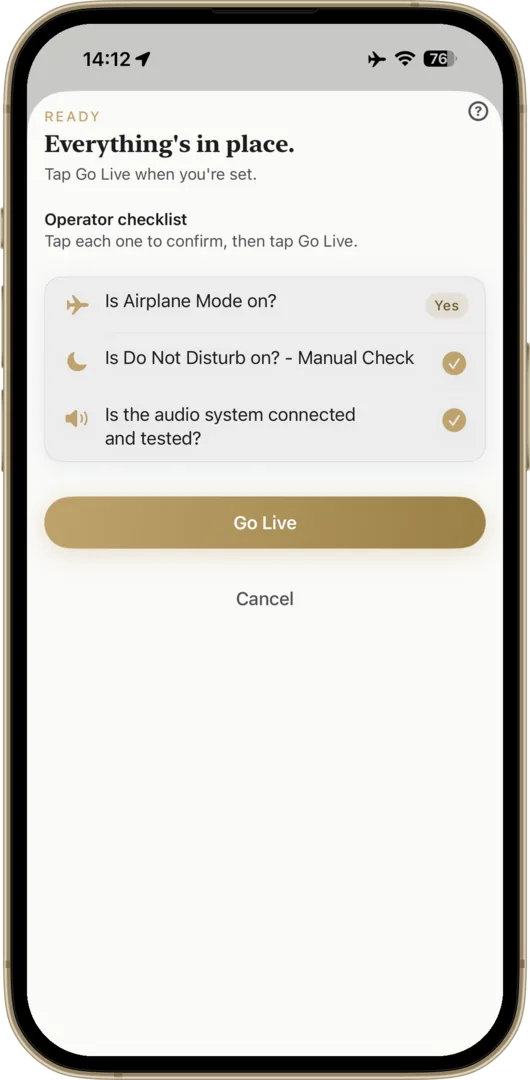
Pre-Ceremony Readiness check

Dedicated Go Live Mode

Tap Go Live and everything locks. No accidental taps, no wrong version. Big controls, one-tap fade when the moment's right.
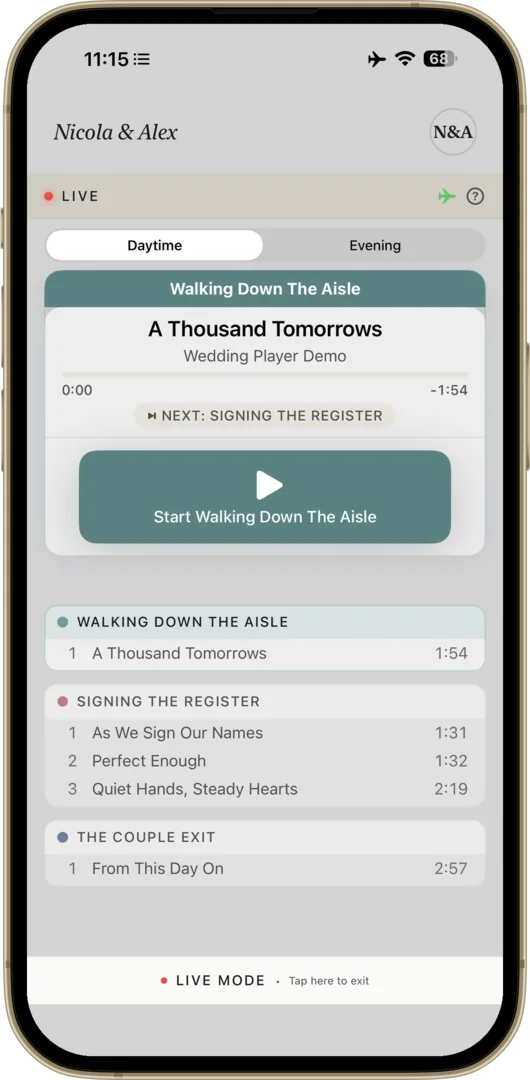
Live Mode
Features

Seamless Transitions

Smooth crossfades. No awkward silences, ever.

Ceremony Timeline

Build moments for each part of the day, each with its own songs and fades. Play through, or loop until you're ready to move on.

Volume Normalisation

Quiet and loud tracks play at the same level. No frantic adjustments.

Loop & Auto-Advance

Set moments to loop until you're ready. Auto-advances to the next moment when you are.

Try Before You Buy

Free demo with sample tracks. Experience the full app before purchasing.

Unlimited Moments

Ceremony, drinks, reception. Add as many as you want, split into daytime and evening, to plan the whole day.

One purchase covers iPhone and iPad (and Android on Google Play). Adjustable text size, automatic light and dark mode.

iPhone & iPad

Even more room on iPad

On iPad the split view puts your full ceremony timeline and the now-playing controls side by side, so you can see the whole running order at a glance.
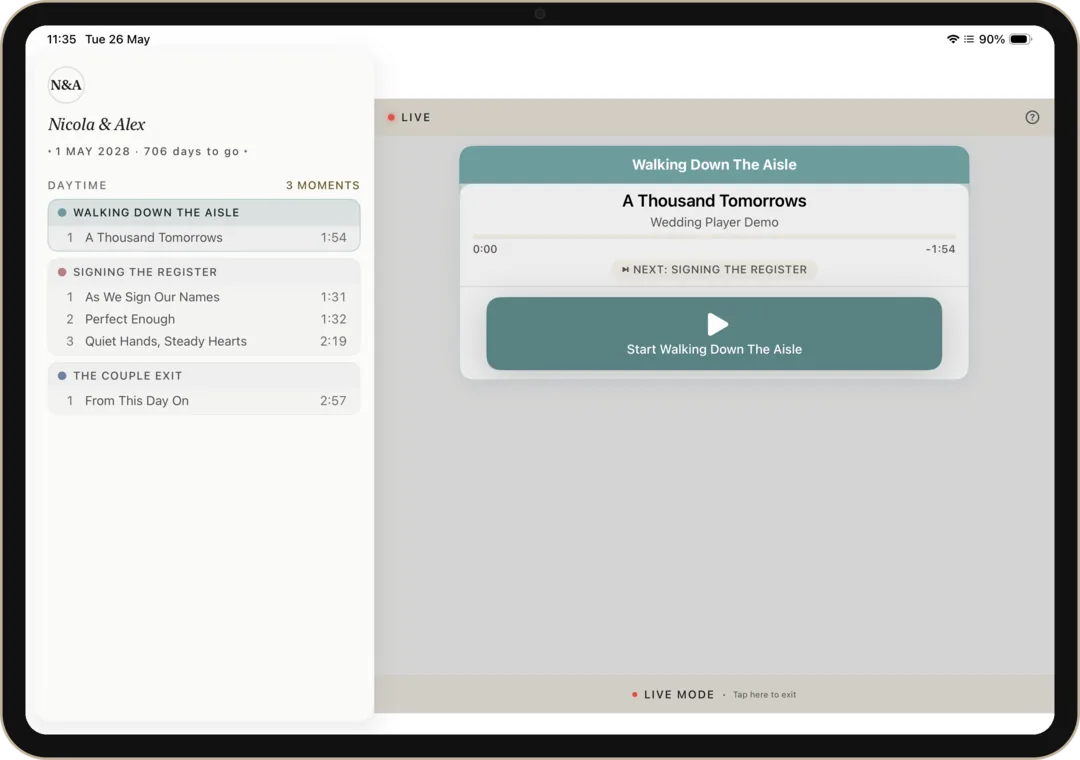
Wedding Player on iPad showing the split-view sidebar with the ceremony timeline
Your Music, Your Way

Three ways to add music. Mix any of them.

Apple Music

Apple Music (iOS)

Already on Apple Music? Add any song from your library or the full catalogue.

Wedding Player

Wedding Player Originals

40 licensed instrumental tracks, included free. New ones added over time, no update needed.

Your own files

Your own files

Add your own MP3, M4A, or WAV. Ripped CDs, purchased tracks, your own recordings.

Mix any of the three in a single ceremony timeline. Every track stored offline.

More than a playlist

A playlist plays songs. A ceremony needs more.

How Wedding Player compares with a Spotify or Apple Music playlist for ceremony music
For your ceremony Spotify or Apple MusicWedding Player
Reliable offline playback1 Partial Yes
Locked operator mode No Yes
Trim and one-tap fades on cue No Yes
Ceremony moments timeline No Yes
Pre-ceremony readiness check No Yes
  • 1 Spotify and Apple Music play offline only with a paid subscription and every track downloaded first. Wedding Player stores each track on the device, so it always plays in airplane mode.
From the Wedding Community
“The music starts when it’s supposed to, fades when needed.”

Sarah Mary Coughlan

Marriage Solemniser

“I was at a meeting with one of my couples in Preston and they opened your app to chat through their music! They said it was a game changer for them.”

Una Haslinger

Celebrant

Pricing

The Cheapest Line on Your Wedding Budget

Couples

£7.99
One-off purchase · No subscription

The cheapest line on your wedding budget. The most important one.

  • Unlimited moments
  • Wedding Player Originals: licensed instrumental tracks, included free
  • Mix Apple Music tracks (iOS) & custom files
  • Crossfade & fade-out transitions
  • Live Mode with locked, panic-proof controls
  • Volume normalisation across all tracks
  • 100% offline, works in airplane mode

One-time purchase. No ads. No tracking. Free demo included.

Download on the App Store Get it on Google Play Free to try

Managing multiple weddings? See the Professional Licence →

The Story

Built for a Real Wedding

I built Wedding Player for my daughter Nicola's wedding in March 2026. Nothing on the App Store did what we needed. It worked flawlessly on the day. The venue co-ordinator asked for a copy afterwards, unprompted.

– Don McAllister, father of the bride

Read the full story

FAQ

Common Questions

Is it really a one-off price for couples? Is there a subscription?
Yes, really. £7.99 is the full price for couples: a one-time purchase, yours forever, no subscription, no auto-renewal, no upsells, no hidden costs. We get asked this a lot because most apps in 2026 are subscriptions; for couples, Wedding Player isn't. Both tiers include a free demo, so you can try everything before buying. The separate Professional Licence (£5.99 a month or £49.99 a year, with a free month to start) is only for venues, celebrants and planners running ceremony music across multiple weddings; couples don't need it.
Do I need an Apple Music subscription?
No. Wedding Player includes Wedding Player Originals, 40 fully licensed instrumental tracks covering every part of the ceremony (11 prelude, 11 processional, 10 signing the register, 8 recessional), with styles from classical (Canon in D, Bach, Mendelssohn) to contemporary (modern piano, indie folk, soul brass). New tracks appear automatically, no app update needed. Apple Music is optional: use it for a specific song from your own library, or stick with Wedding Player Originals and your own audio files.
Why not just use Spotify or Apple Music directly?
Spotify doesn't allow third-party iOS apps to play its tracks, online or offline, so the only option would be remote-controlling the Spotify app: ads on the free tier, no fade control, no ceremony timeline, and no protection if Spotify crashes mid-processional. Apple Music can play your tracks, but on its own it can't mix streaming songs with your custom-edited files in one playlist, has no ceremony timeline, no fade-out controls, and no protection against operator error. Wedding Player builds directly on top of Apple Music and adds all of that. Most songs are on both platforms anyway, and you can always pick from Wedding Player Originals or import any local audio file (MP3, M4A, WAV). Read the full explanation.
What if I need to pause or fade out?
One tap in either Rehearsal Mode or Live Mode. The track fades out smoothly over 2 to 15 seconds (you choose). You watch the room and end the music when the moment is right, not when the track decides to end.
Who presses play on the day?
Anyone you trust: a friend, a family member, your venue co-ordinator. Live Mode locks the playlist so they can't accidentally play the wrong song or the wrong version. The controls are deliberately oversized, designed for nervous hands, not tech experts.
I don't want to hand my personal phone to a stranger. What are my options?
Use iOS's built-in Guided Access mode to lock your phone to Wedding Player and nothing else. The home button, app switcher, notifications, and every other app are all blocked while it's on. Anyone holding the phone can only use Wedding Player. Setup takes 30 seconds. Step-by-step guide here.
What devices does it work on? Is it on Android?
iPhone and iPad running iOS 17 or later, and Android phones and tablets: Wedding Player is now live on Google Play. The Android app is a fully featured equivalent of the iPhone and iPad app (same ceremony engine, same Go Live Mode, same crossfades, same fully offline playback, plus Wedding Player Originals, 40 ceremony-ready instrumental tracks). The one difference is that Apple Music integration is iOS only, so on Android you build your ceremony from your own music files and Wedding Player Originals.
How do I connect to the venue's speakers?
Check with your venue. Many have Bluetooth connectivity to their PA system, so just pair your iPhone or iPad. Others have a 3.5mm aux input or a USB connection. Ask the venue co-ordinator before the day so there are no surprises. Bring a backup cable just in case. Read the full guide.
New in v2.1.7

A guided voiceover walks you through the demo (replay any time), share Wedding Player by QR code or a ready-to-send email, and wedding pros get new monthly and annual Pro plans, each with a free month.

Read full notes →

Your Wedding. Your Music. Perfectly Timed.

Set it up once. Press play with confidence. The ceremony is the one part of the day you can't redo. Make the music perfect.

Download on the App Store Get it on Google Play Free to try
View Press Kit